
Staff and Time Attendance
Staff clock in and out by scanning a QR code posted at a zone with their phone, with their location checked. The daily list, attendance report and monthly timesheet come from the same records, and leave and personnel files live in the same place.
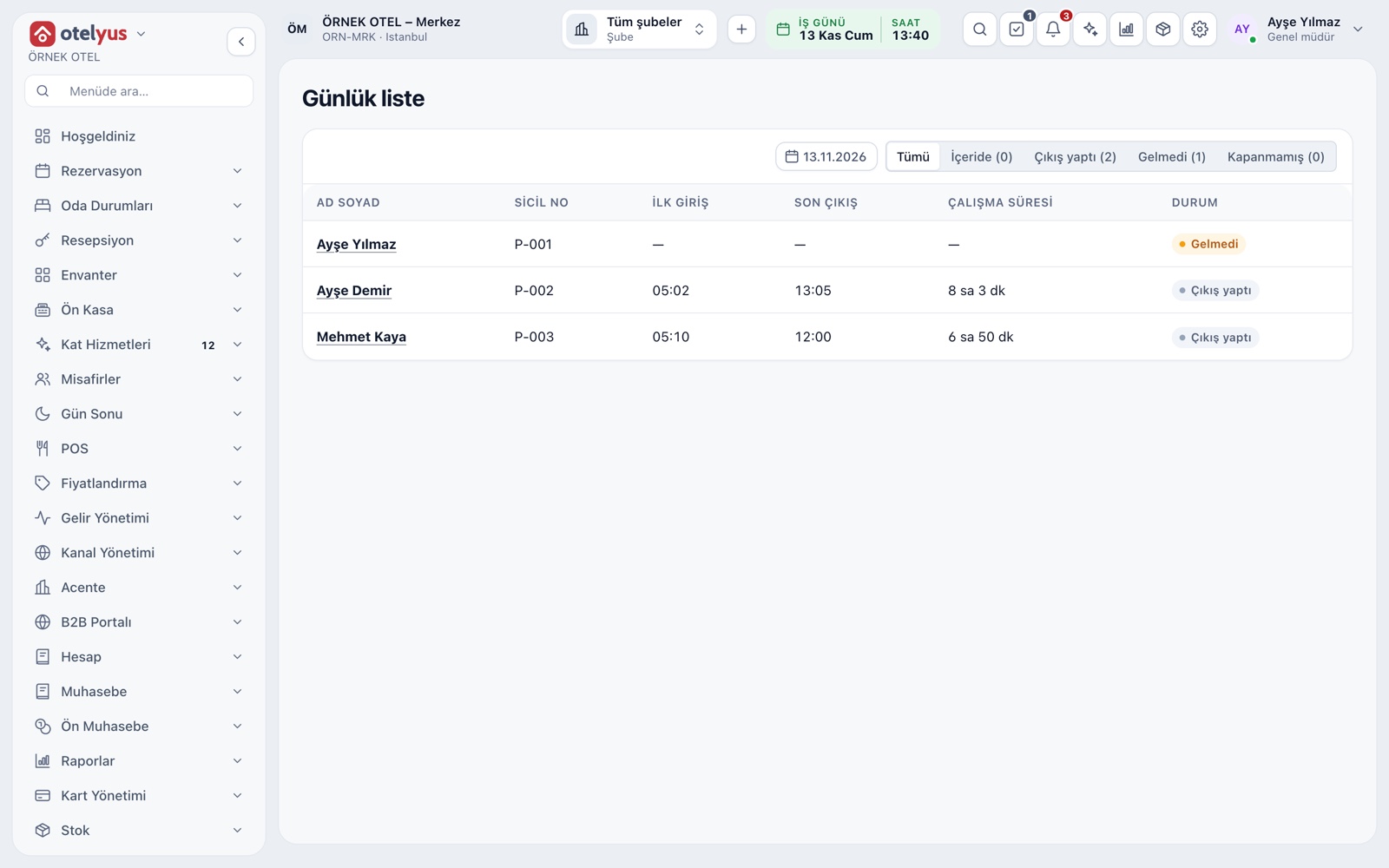
Daily List: Who Came, Who Did Not
Staff scan the QR code posted at their zone with their phone; their location is checked and a clock-in or clock-out record is created. All staff for the day you pick appear in one list: first in, last out, hours worked and status. You see at a glance who did not show up in the morning and who forgot to clock out in the evening.
- Status: inside, clocked out, absent or not closed.
- Tab headings show the count for each status.
- A clock-in without a clock-out is marked as not closed.
Zones and QR Codes
Each clock-in point is a zone, defined by name, type, location and radius. Every zone has its own QR code, which you print and post at the entrance. The QR code alone does not clock anyone in: the employee's location is also checked against the zone radius, and outside the zone no record is created.
- A zone can be clock-in only, clock-out only or both.
- The camera opens only when the employee starts it; no image is recorded.
- An employee cannot clock out without clocking in.
- When a QR code is renewed, the printed old one stops working.
Records and Manual Corrections
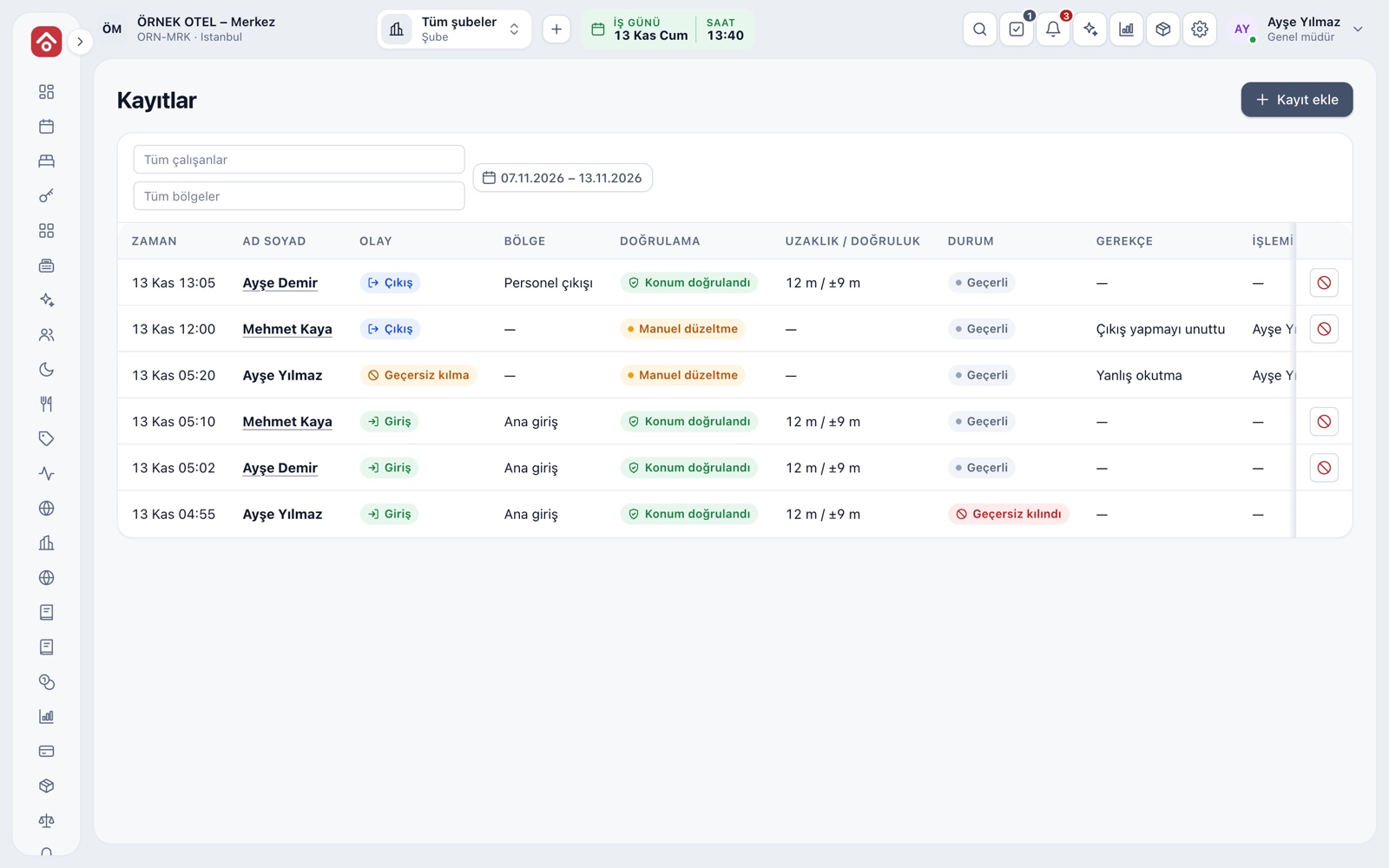
The Records screen gives every clock-in and clock-out with time, employee, zone, distance and status. For a forgotten or wrong record you add a manual one; it is marked as a manual correction and written to the audit trail with its reason. A wrong record is not deleted but voided.
- Employee, zone and date range filters work together.
- Manual records and voiding require a reason.
- Each row shows the user who made the change.
Attendance Report
The attendance report gives per-person totals and a daily breakdown for the chosen range: days worked, total time, missing clock-outs and number of corrections. The report can be taken as Excel or PDF, and at month end a manager or accounting checks the timesheet against it.
- Missing clock-outs are counted in a separate column.
- The number of manual corrections is tracked per person.
Monthly Timesheet and Overtime
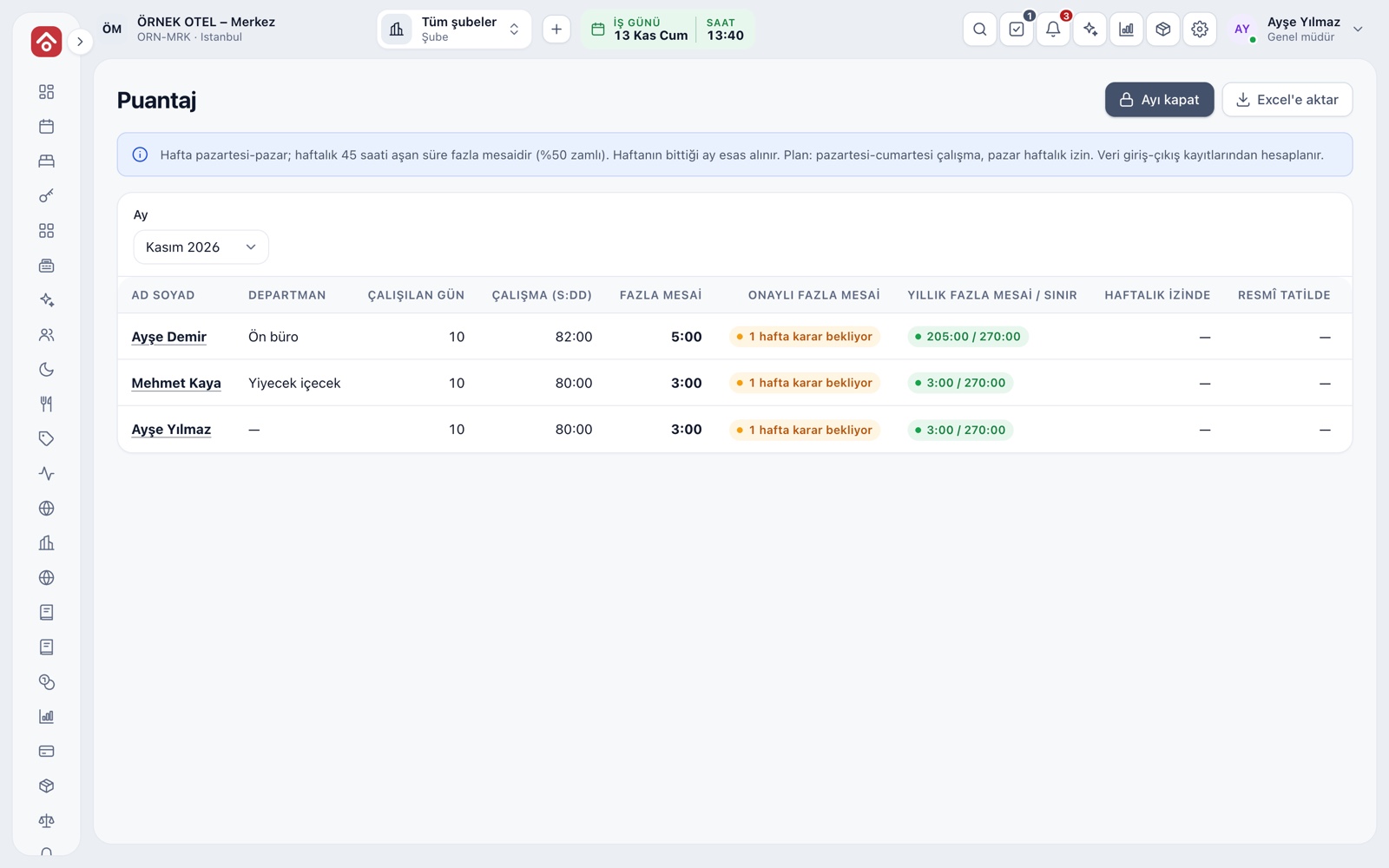
The timesheet is calculated monthly from clock records: days worked, hours worked, overtime, leave and absence. Time above the weekly limit becomes overtime and goes to weekly approval. When you close the month, the totals are frozen. Please confirm the limits and premium rates with your accountant.
- The number of weeks awaiting a decision is shown.
- A warning appears as the annual overtime limit approaches.
- A change after closing is made with a separate correction record.
Shift Plans and Leave
Shift templates are defined once and then assigned to the weekly plan. A leave request goes first to the department manager and then to HR for approval. Annual leave entitlement is calculated from the hire date, and Sundays and public holidays are deducted from the day count.
- Leave types such as annual, marriage, birth and sick leave come ready.
- Remaining annual leave cannot be exceeded.
- Leave length is previewed with public holidays at request time.
Personnel File and Personal Data
A personnel file has tabs for identity and contact, employment, social security and bank, emergency and documents, and documents about to expire are flagged. Employees accept the privacy notice before their first clock-in. Raw latitude and longitude are not stored; only the zone, distance and accuracy are kept.
- Personnel details are updated in bulk with Excel, with a preview first.
- Files of sensitive documents such as health reports are not stored.
- Candidate data is kept only with explicit consent.
Modules used together
Reports and Analytics
Occupancy, revenue, sales, stock cost and tax support summaries sit in one centre, each as a report tied to its own permission. Reports can be filtered, exported and scheduled by email.
Learn moreAudit Trail
Who changed what, when, and from which value to which: every important action is written to an unalterable log. Records cannot be deleted, and any attempt to tamper with one is detected.
Learn moreMulti-business Consolidation
A business's hotel, restaurant and venue branches and its legal entities are managed in one account. You choose the report scope by branch, legal entity or department and see consolidated income and expenses and intercompany reconciliation.
Learn moreFrequently Asked Questions
What if an employee fakes their location?
The system cannot tell fake-location apps apart; location checks are indicative, not conclusive. Records stay open to manager review.
Could someone clock in remotely with a photo of the QR code?
No. The QR code alone does not clock anyone in; if the employee's location is not verified within the zone radius, no record is created.
What if an employee forgets to clock out?
A manager adds a manual record. It is marked as a manual correction and written to the audit trail with its reason.
Do employees see a privacy notice?
Yes. Employees read and accept the notice before their first clock-in, and you can replace the text with your own.
If I only run a restaurant or an event venue, can I add this module?
Yes. It is not a separate product; it can be used whatever your business does, and data is held once at business level.
Meet Staff and Time Attendance
Let us call you for a live walkthrough, or try it free for 1 month.