
Equipment and Extra Services
Define sound, lighting, decoration, photography and music as items under your own names, add them to a booking and show them in the contract. Prices are managed by permission, and who delivers the job is set through crew assignment.
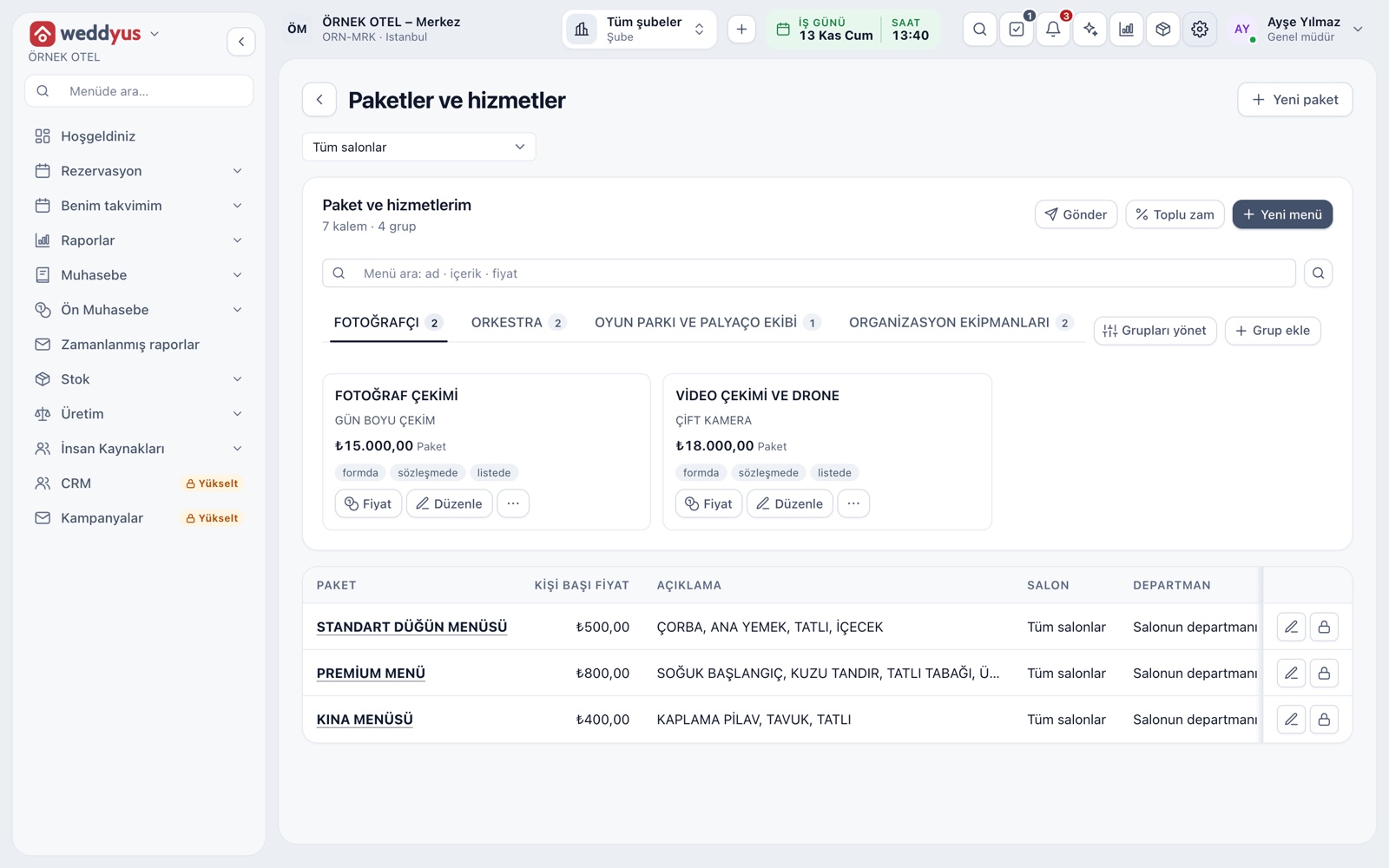
Service groups and items
Extra services sit under groups on the Packages and Services screen. You set up groups such as photographer, orchestra, play area and event equipment to fit your needs. Each item shows as a card with name, description, price and unit.
- Add, reorder and deactivate groups from one screen
- A group with items is deactivated, not deleted; history stays
- Card buttons let you set a price, copy or hide an item
How an item is defined
An item is created with a name, description, group, price and unit. Units include piece, hour, day, night, square meter or lump sum: a sound system can be priced as a lump sum, a projector per day, decoration per square meter. The description is printed on the contract too.
- An item can belong to one venue or all venues
- Where it shows is set separately: new job form, contract or price list
- An item with no price shows Ask for price to the customer
- Each item carries a tax class
Adding to a booking
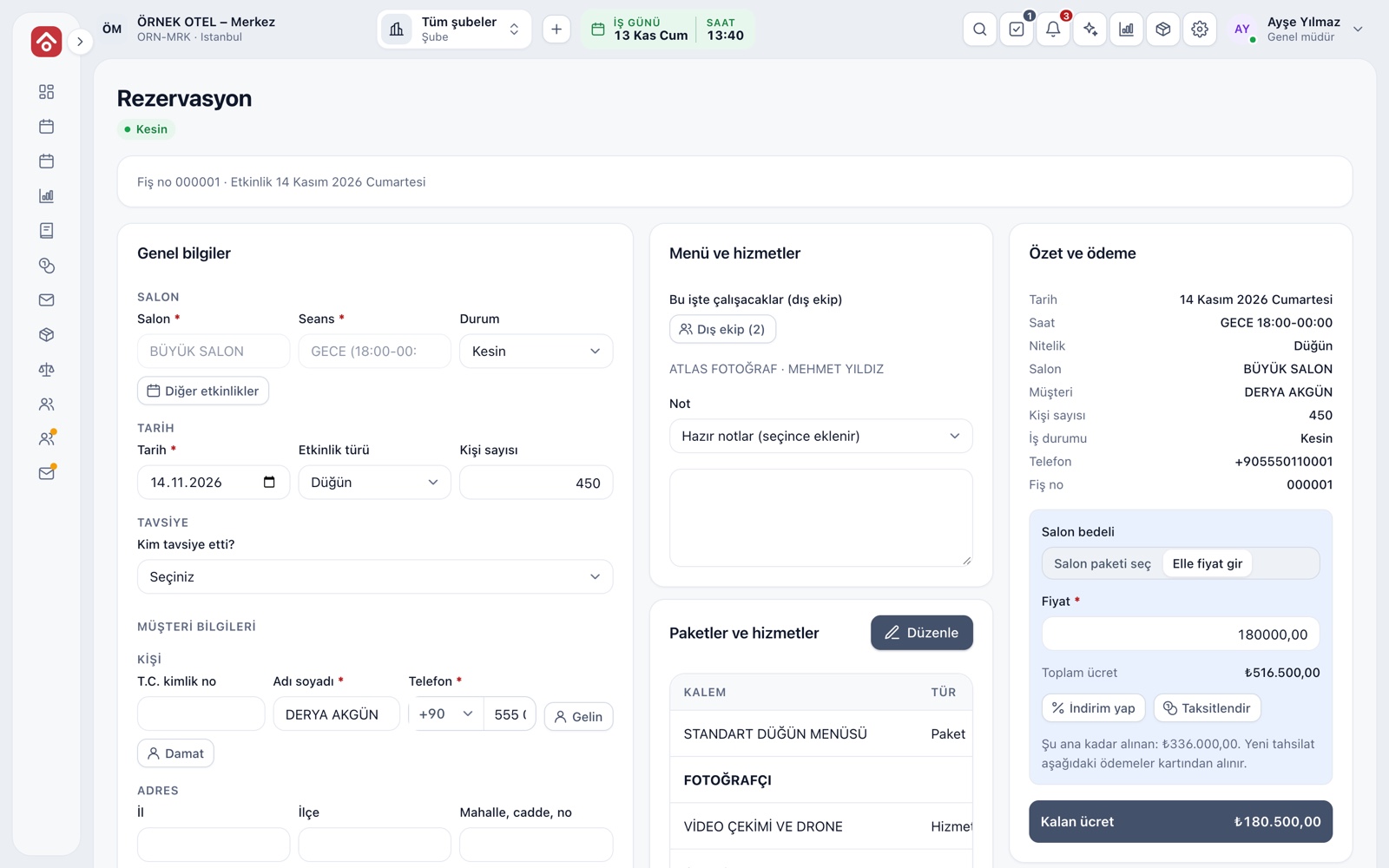
On the booking's Packages and services card, Edit adds items. For a job not in the catalog, a manual item can be typed in. One button applies the total to the contract amount, so a sound or lighting extra the customer asks for later flows into the amount and payment plan traceably.
- Package, service and product lines sit in separate tables in one file
- The screen reminds you if the sales total differs from the contract amount
- Items can be edited on quote, on-hold, optioned and confirmed bookings
Permission to change prices
The catalog price comes into a booking automatically. Writing a different price is a separate permission: an authorized user saves the line with a custom price and the catalog price is kept on the line. Without the permission, the catalog price applies, so a sales rep who negotiates is kept apart from a manager who sets prices.
- A custom-priced line is marked with a star
- Hover to see the catalog price
- The contract also notes the difference
Who delivers it: crew assignment
The price of a service and who delivers it are two separate records. In the booking's crew field you pick people from the staff list and write their roles: photographer, videographer, musician, DJ, sound and lighting, valet, decoration, organizer. The assigned person sees the job on their My Calendar screen.
- Someone not on the list can be added without an account
- A photographer sees only their own media project, never the amounts
- Crew names are written into the contract's crew field
Product extras
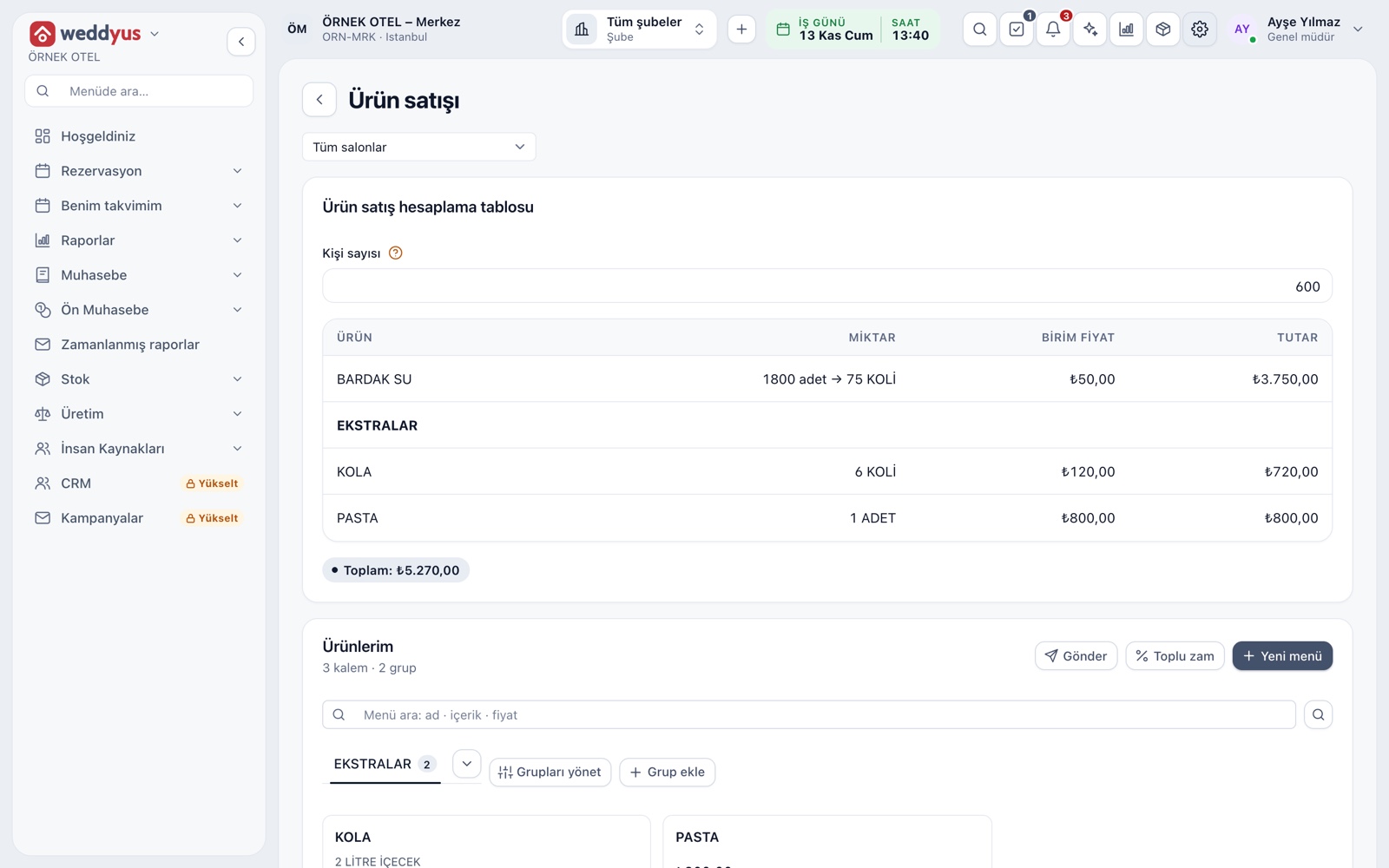
Extras are items that grow with the guest count: cola, water, cake. On the Product sales screen they are defined with a ratio and case size, and entering the guest count gives the quantity and amount. A service is a fixed job while a product varies with numbers; both add up in the same contract amount.
- A product can be sold by the case or by piece, with rounding set
- A product item can optionally link to a stock card
- The product quantity can be changed by hand on the booking
Modules used together
Packages and Menu Planning
Wedding packages, menu, beverages, cake and decoration items
Learn moreQuotes and Contracts
Same-day quote, PDF from template, digital approval
Learn moreEvent Operations
Staff, equipment and task lists
Learn moreEvent Order (BEO)
Event order sheet: program, menu, layout and responsibilities
Learn moreWedding Tracker
One file for every event
Learn moreFrequently Asked Questions
Can I sell my sound and lighting system as an extra service?
Yes. Define the item with its own name and price, put it in a group and add it to a booking. You can also sell it without showing it in the contract.
Can I change a service price on a booking?
Only if you have the price-change permission. The line is marked and the catalog price is kept on it.
What is the difference between a service and a product extra?
A service is a fixed job, like a sound system. A product extra grows with the guest count, like drinks, and its quantity is calculated.
Is the outside crew sent an SMS?
Not when added without an account. A person given login access sees the job on the My Calendar screen.
Does an extra service deduct stock?
No. A stock card can only be linked to product lines; service items do not deduct stock.
Meet Equipment and Extra Services
Let us call you for a live walkthrough, or try it free for 1 month.