
Identity and Access Management
Sign-in starts with your business code, and users, roles, two-step verification, sessions and API keys are managed in one place. Nobody can grant more access than they hold themselves.
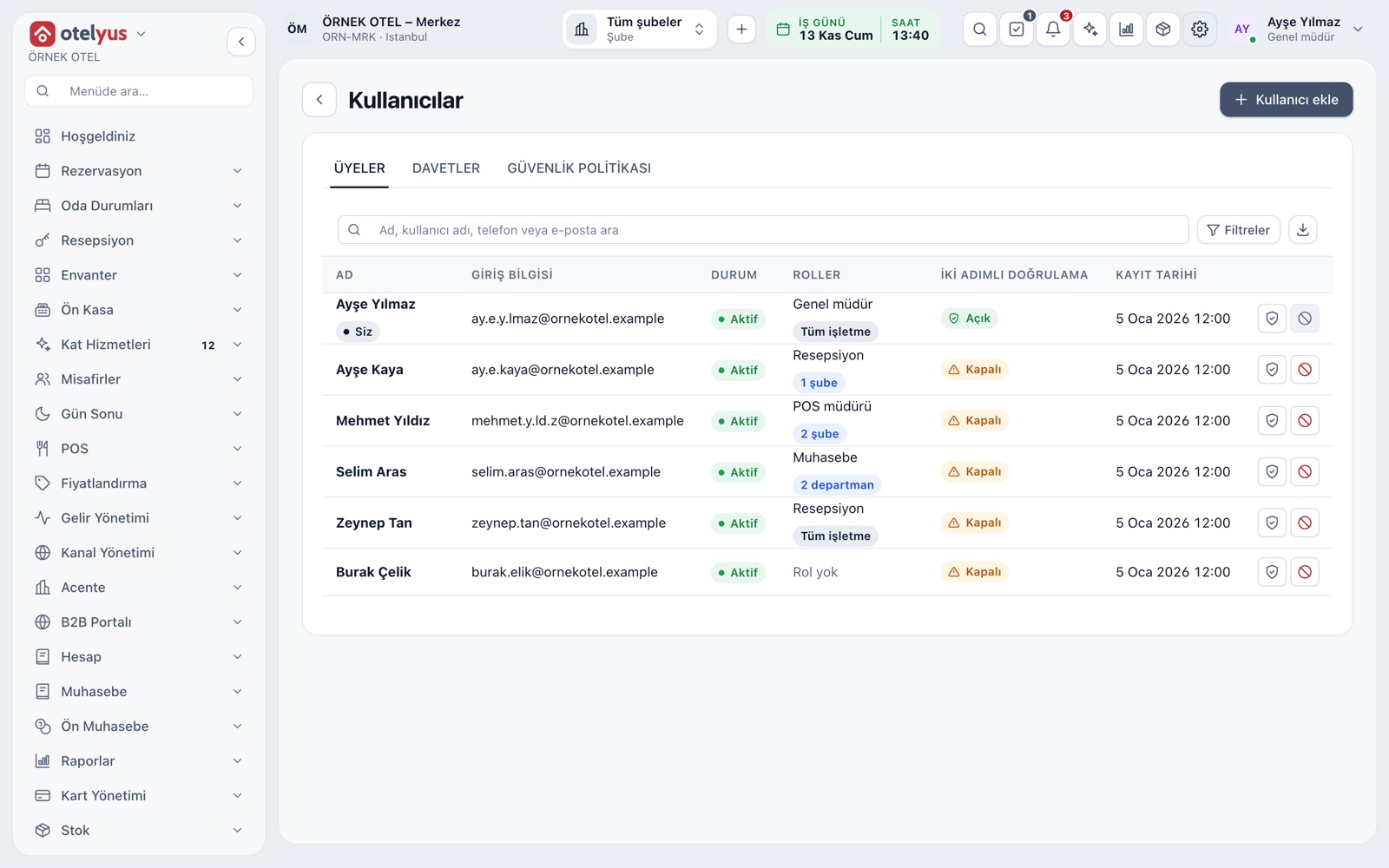
The users screen
The users screen has three tabs: Members, Invitations and Security policy. The member list shows name, sign-in details, status, roles and two-step verification status. You add a user by setting the password yourself, or invite them by email.
- A deactivated user cannot sign in and open sessions close.
- You cannot deactivate your own membership from this screen.
- The list is searchable and exports to CSV.
Business code first, then identity
Signing in has two steps: first your business's numeric code, then email, mobile number or a username that is unique within the business, plus a password. A user who belongs to several businesses chooses which one to work in. If a password is forgotten, a link goes to email or an SMS code to the phone.
- Accounts used in the same browser are listed and can be removed one by one on a shared computer.
- A new member's invitation arrives by email and can be withdrawn or expire.
- A wrong sign-in never reveals whether the account exists.
Ready-made and custom roles
The built-in roles follow how work is divided: business owner, general manager, reception, housekeeping, cashier, accounting, storekeeper and so on. If you need a different set of permissions, copy a ready-made role into a custom one. A role is assigned to the whole business or to selected properties only, and nobody can grant a role above their own access.
- Every permission is listed openly in one place; there are no hidden rights.
- Narrow roles such as Accountant and Viewer can only read.
- Removing a role assignment drops its permissions immediately.
- Creating custom roles is a plan feature.
Two-step verification
Two-step verification works with a six-digit code from an authenticator app. During setup the user receives recovery codes to use if the phone is out of reach. An administrator can make it mandatory for everyone in the business from the security policy.
- You must have it set up on your own account before enforcing it, so you cannot lock yourself out.
- Remember this device reduces how often the code is asked.
- The member list shows each user's verification status.
Sessions, screen lock and passwords
The sessions screen lists open sessions in the business by user, last activity and browser, and you can end them one by one or all at once. A four-digit PIN locks the screen without signing out. The password strength meter refuses weak passwords, and repeated wrong attempts lock the account for a while.
- Changing a password closes all other sessions.
- Easily guessed PINs are refused.
- Support sessions are marked with a Support label.
- Identity events are kept in the audit log.
API keys
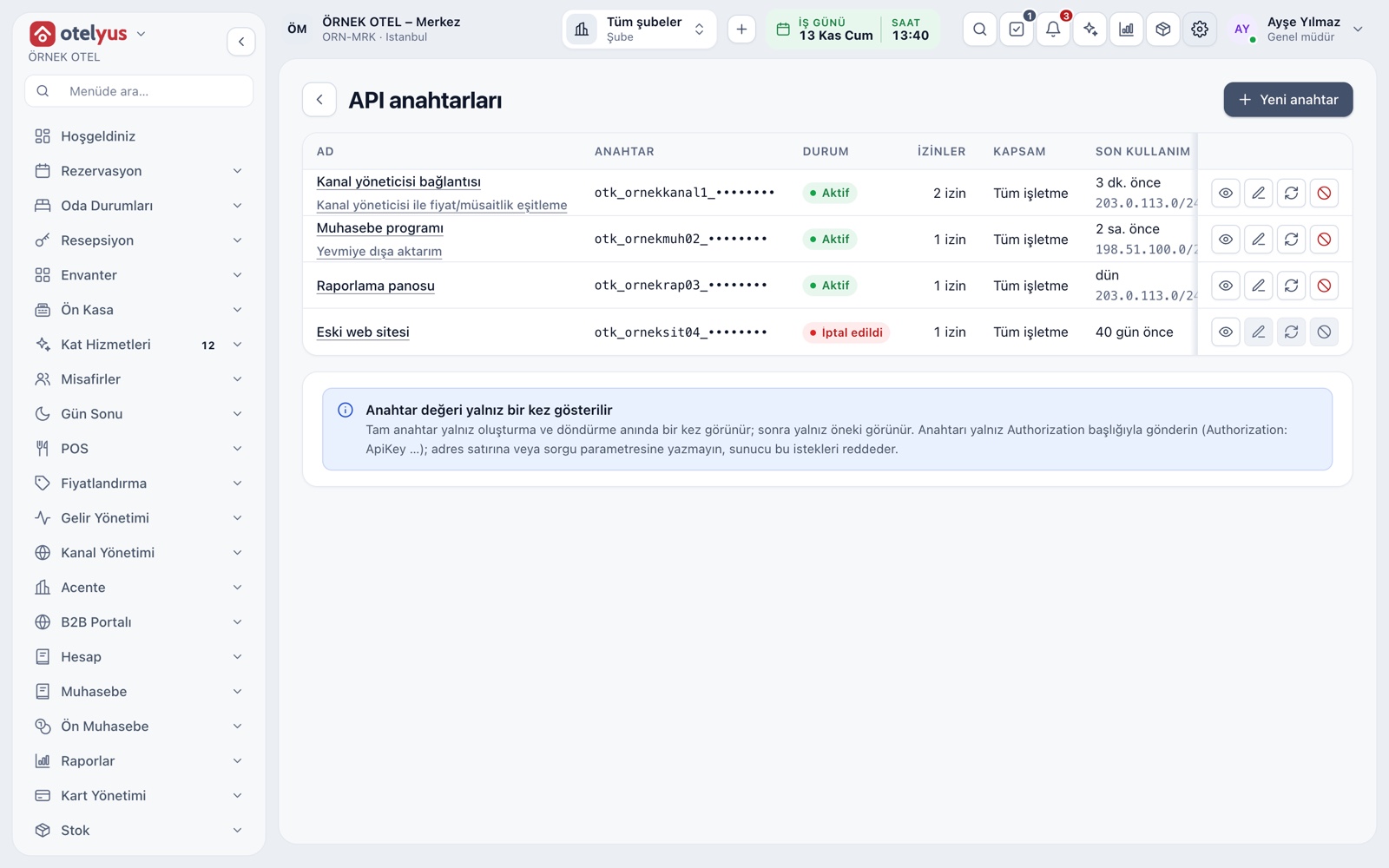
An API key is an identity for integrations that is independent of any user: scoped, time-limited and revocable. The key is visible only at creation, and identity management permissions can never be given to a key.
- A key is scoped to the whole business or to selected properties.
- Rotation creates a new key, and the old one expires after the grace period.
- Revocation takes effect at once and cannot be undone.
Support access and your accountant
There is no shared support account or password. Support staff come in under their own identity and only with the approval of the business administrator; access is time-limited and read-only, and every action appears in the audit log. You invite your accountant by email; they read documents and reports and cannot change any record.
- You can start support access yourself, or decline an incoming request.
- Revoking access closes open support sessions at once.
- Accountant access can be removed whenever you like.
Modules used together
Users and Roles
Manage users, ready-made and custom roles, cashier permissions, API keys and support access in one place. Every permission is listed openly, and nobody can grant more than their own rights.
Learn moreUsers and Permissions
Server, cashier, kitchen and manager roles come ready. You invite users, assign them to POS outlets, and on a shared till each person works under their own name with a PIN. Sensitive actions sit behind separate permissions.
Learn moreAudit Trail
Who changed what, when, and from which value to which: every important action is written to an unalterable log. Records cannot be deleted, and any attempt to tamper with one is detected.
Learn moreAPI and Developer Portal
Reach reservation, rate, folio and other data through a REST interface and permission-scoped API keys. Build your own connections to a channel manager, POS or accounting system.
Learn moreData Security and KVKK
Each business's data is kept apart; sensitive fields are masked and access is logged. KVKK requests, retention periods, legal hold and destruction are managed in the software. Compliance takes more than software, and this page describes the tools.
Learn moreFrequently Asked Questions
Which role should I give each user?
Giving each person the narrowest role that lets them do their job is a good start. If needed, copy a ready-made role and build your own.
Can I make two-step verification mandatory for everyone?
Yes, from the security policy. A user without it sets it up at their next sign-in. You must have it set up on your own account first.
What should I do when an employee leaves?
Deactivate the user. They can no longer sign in and open sessions close, while their past records stay in the audit trail.
Can the support team access my data?
Only if the business administrator approves, and then time-limited and read-only. Every action shows in the audit log with a support label.
Meet Identity and Access Management
Let us call you for a live walkthrough, or try it free for 1 month.