
Income and Expense Records
A venue's income is recorded automatically from bookings; expenses are kept in the shared accounting, purchasing and stock modules. There is no separate ledger and no double entry.
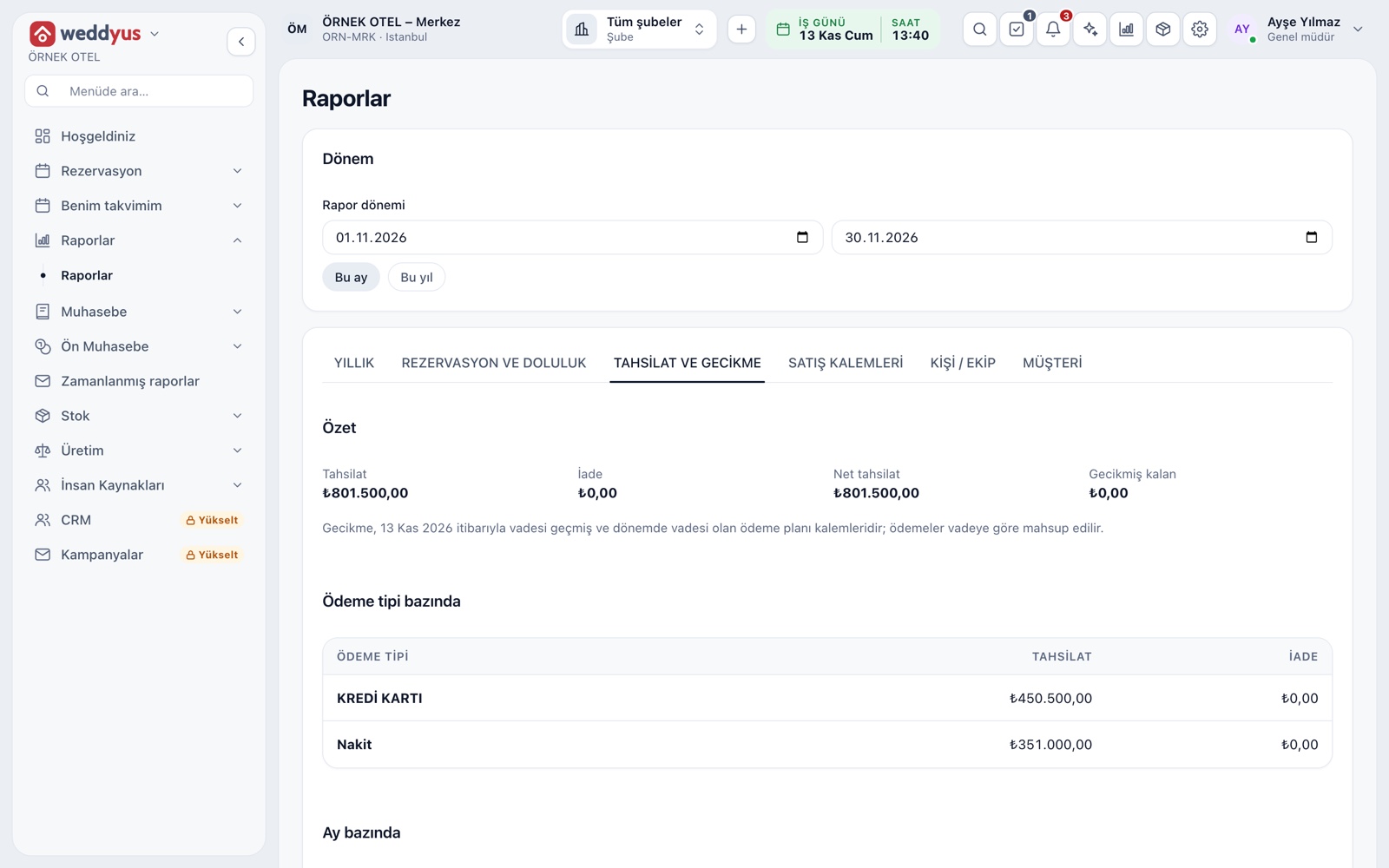
Income side: the collections ledger
A venue's income starts with every payment taken on the booking card. A collection is written to the payment ledger with its amount, date, payment type and register, and a refund becomes a reversing entry. The Collections and overdue tab under Reports summarizes this ledger by period, payment type and month.
- Collected, refunded and net collected appear on one line
- Cash, card and transfer are totaled separately
- Every row shows who took the payment
- The report exports to Excel, CSV or PDF
One record for everything
weddyus does not keep a small cash book just for venues. Income and expense records are gathered in the business's shared accounting layer, in one source; a venue booking sits in the same ledger as hotel, restaurant or staff records. Your accountant sees one ledger, and no amount is entered twice.
- A venue collection never needs a separate manual income entry
- Accounting, stock, purchasing, staff and invoicing open from the same menu
- Corrections are made with reversing entries and leave a trace
- Users without permission cannot reach financial records
How income reaches the books
Deposits and payments received are first tracked as advances; after the event and the number of days set in settings, the service fee goes to income and VAT to the tax account. In mixed baskets (venue, food, organization) each item is split by its own tax class. Confirm rates and timing with your accountant.
- Prices are entered VAT-inclusive; the rate comes from the item's tax class
- After the event the final invoice drops into the To-be-invoiced list
- A price change or cancellation flows through as a difference
Income by venue and department
Each venue belongs to a wedding branch and can optionally be matched to a department. The venue's collections and refunds post to that department's accounting account. The main hall, the henna hall and the open-air area keep their income apart.
- If the department is left empty, the default wedding income account is used
- For items open to all venues, income posts to the selling venue's department
- The wedding branch opens automatically when the first venue is added
Expense side: in the shared modules
Venue expenses are not entered on a weddyus screen; they are kept in the shared modules of the business, each in the way that suits its job. Supplier invoices come from purchasing, daily expenses from pre-accounting and staff cost from staff records. All use the same account and product cards.
- Purchasing: supplier invoices, stock receipt and account payable
- Pre-accounting: expense entries, category, cash and bank account
- Staff: salary, bonus, advance and deduction records
- Stock: items consumed on the event day are deducted from the warehouse
Cost center for an event or venue
In a business using pre-accounting, a project can be opened for a big event or a venue. A project has a name and code and may have a budget; expenses are linked to it. The project report gives income, expense and a budget comparison in one place.
- A project is closed, not deleted; a closed project accepts no new expenses
- The expense report shows which item is straining the budget
Modules used together
Deposits and Installment Collection
Payment plan, collection, receipt and reminders
Learn moreReceivables and Overdue Tracking
Outstanding balances, overdue payments and alerts
Learn moreVenue Reports
Occupancy, revenue, deposit aging, conversion rate and cancellation reasons
Learn morePackages and Menu Planning
Wedding packages, menu, beverages, cake and decoration items
Learn moreMulti-venue Management
Multiple venues and branches in one account
Learn moreFrequently Asked Questions
Does weddyus have its own income and expense ledger?
No, by design. Income flows into the shared accounting layer with each collection; you enter expenses in purchasing, pre-accounting or staff modules.
Can I see a venue's profit and loss?
Income appears in weddyus reports and expenses in the reports of the shared modules. Reading the Monthly Income tab of the yearly report together with accounting reports gives you the venue's result.
Does it work without the accounting module?
The collections ledger and reports work independently. Journal entries, VAT separation and official reports need the accounting module.
How do I split expenses between venues?
Venues are linked to a branch and department; you follow expenses through that department or a pre-accounting project. Choose the right structure together with your accountant.
Who sets the VAT rates?
Rates come from tax classes and are managed by the business. Check current rates and invoice timing with your accountant.
Meet Income and Expense Records
Let us call you for a live walkthrough, or try it free for 1 month.