
Quotes and Contracts
Give the price the day a customer calls, put the date on option, then generate the contract PDF from a ready template using the booking's details. The signed copy stays in the booking file.
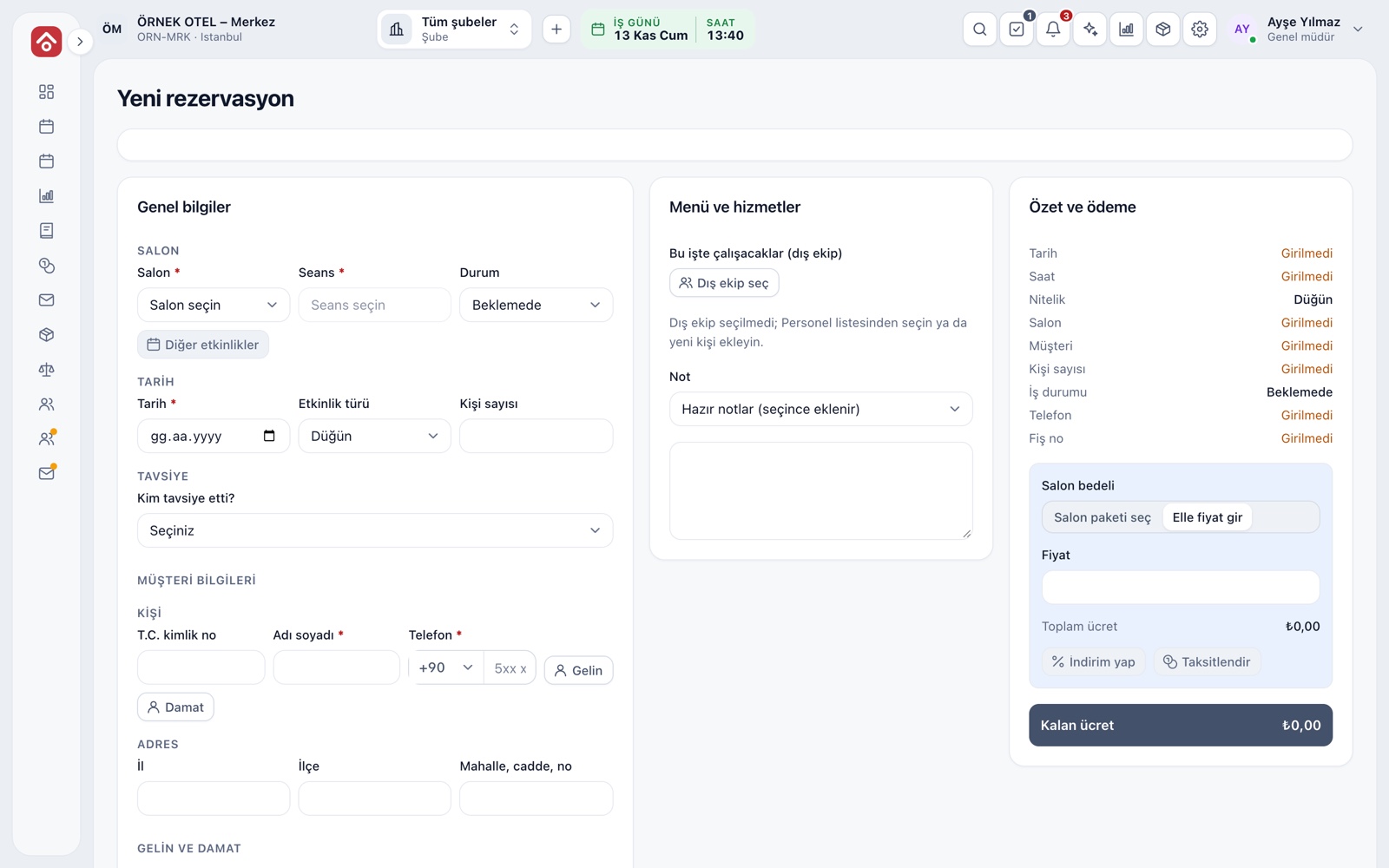
Same-Day Quotes
When a customer asks for a price by phone or at the venue, you open the new booking form: enter the venue, session, date, event type and guest count, then pick or type the price. The record is saved as a Quote and does not hold the venue; to hold the date, you turn the same record into an Option.
- Choose Pending, Quote, Optional or Confirmed as the status.
- Quotes are collected in their own view on the Bookings screen.
- A quote for a taken date triggers a clash warning.
Venue Fee: Package or Manual Price
You enter the venue fee in one of two ways: pick one of the venue packages your business has defined (weekday daytime, Saturday night, summer season and so on) or type the amount yourself. Even if the package price changes later, the amount in the booking is kept, so your quote stays valid at the old figure.
- Give packages start and end dates to set seasonal prices.
- With no package for the date, the form suggests a manual price.
Contract Amount
The contract amount is the sum of the venue fee, packages, products and service items, minus discounts. Prices are entered with VAT included, and VAT is separated at each item's own rate. Rates depend on legislation; please confirm current rules with your accountant.
- The payment plan total cannot exceed the contract amount.
- Every discount is stored with its reason and date.
- The amount cannot be set below what has already been paid.
Templates and Cancellation Table
Two sample templates come ready, one for venue hire and one for services; you adapt the wording to your business. Fields in the text, such as customer, date, venue, amount and payment plan, fill in automatically. Each template also carries a cancellation table showing what percentage of the fee is kept if the event is cancelled a given number of days before.
- Have the sample texts reviewed by a legal adviser before use.
- A cancellation table has up to 12 tiers.
- The suggested cancellation fee in a settlement comes from this table.
PDF from a Template
On an optional or confirmed booking, you pick a template on the Contract card and choose Create contract; the text is filled with the booking's current details and a PDF is produced. You print it, have it signed and upload a scan of the signed copy to the same card.
- A document keeps the amounts from when it was created.
- Creating a new version does not delete the old one.
- Every version has a PDF download button.
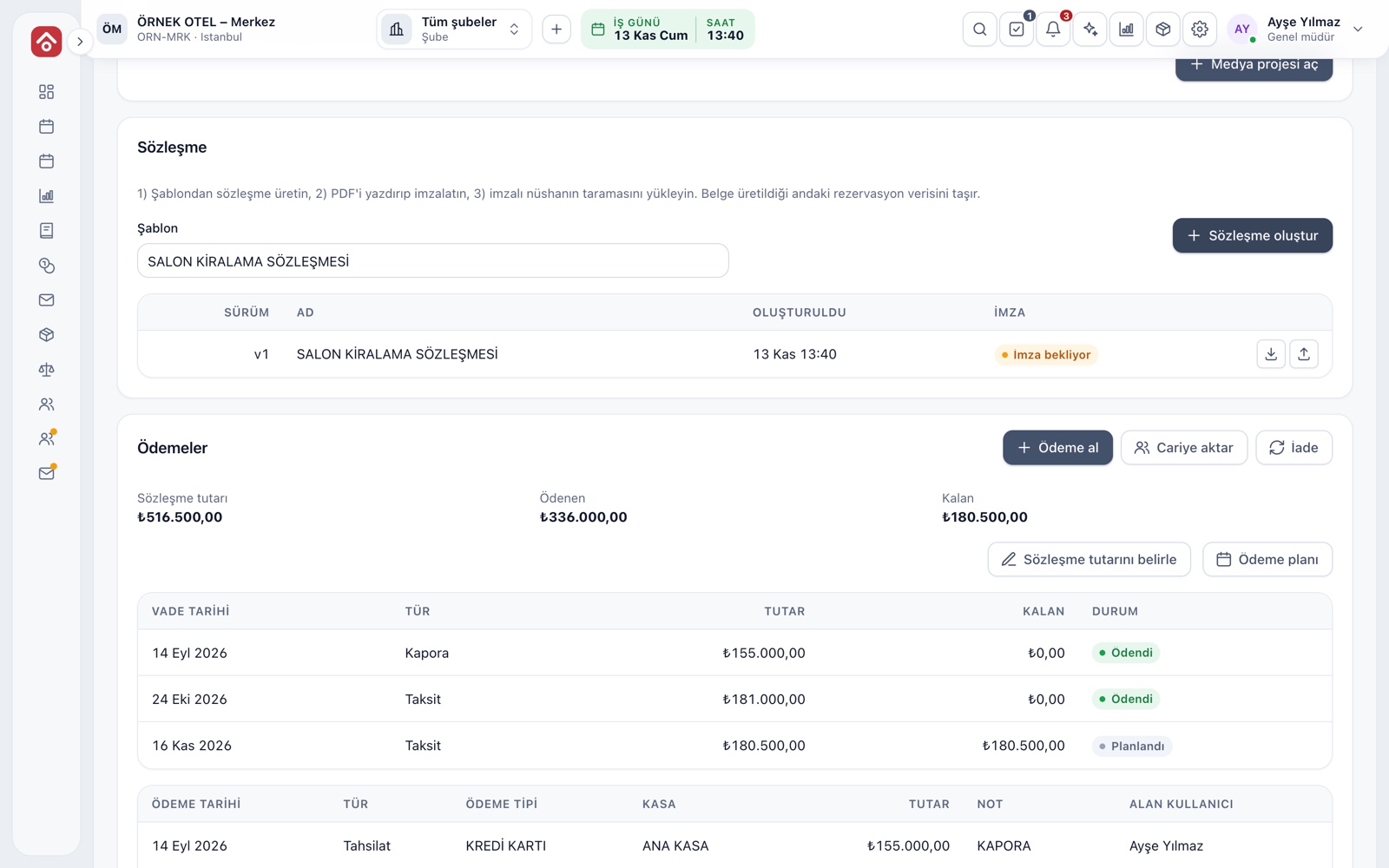
Signed Copy Stays on File
The scanned signed copy is uploaded to the contract's row, and the status shows Awaiting signature or Signed copy on file. Instead of a paper cabinet, the booking's own file becomes the right place for the contract, and who uploaded it and when is on record.
- A file can be up to 10 MB.
- Header and footer notes, payment plan and signature area on the printout are adjustable.
- Creating and uploading are recorded in the audit trail.
Modules used together
Venue Calendar and Booking
Day/night calendar, option periods, conflict warnings
Learn moreLeads and Customers
Lead card, meeting notes and conversion to customer
Learn morePackages and Menu Planning
Wedding packages, menu, beverages, cake and decoration items
Learn moreDeposits and Installment Collection
Payment plan, collection, receipt and reminders
Learn moreWedding Tracker
One file for every event
Learn moreFrequently Asked Questions
Does a quote hold the venue?
No, a quote does not reserve the date. To hold it, change the booking to Optional or Confirmed; an option holds the date for the period you set.
How do I get the contract signed?
The contract is generated as a PDF. You print it, have it signed and upload a scan of the signed copy to the booking.
Does a contract text come ready-made?
Two sample templates are included, one for venue hire and one for services. Have them reviewed by your legal adviser and adapt them before use.
Who sets the cancellation percentages?
Your business does. The cancellation table is defined per template; the sample tiers are only a starting point.
What happens to an old contract if the amount changes?
The old document keeps the figures from when it was created. To reflect the new amount, generate a new version; the old one is not deleted.
Meet Quotes and Contracts
Let us call you for a live walkthrough, or try it free for 1 month.