
Leads and Customers
Every prospect who calls or walks in is recorded, with a follow-up date and inquiry status. Once a prospect reaches a contract, one click turns the inquiry into a booking. Customers are kept with their events and revenue.
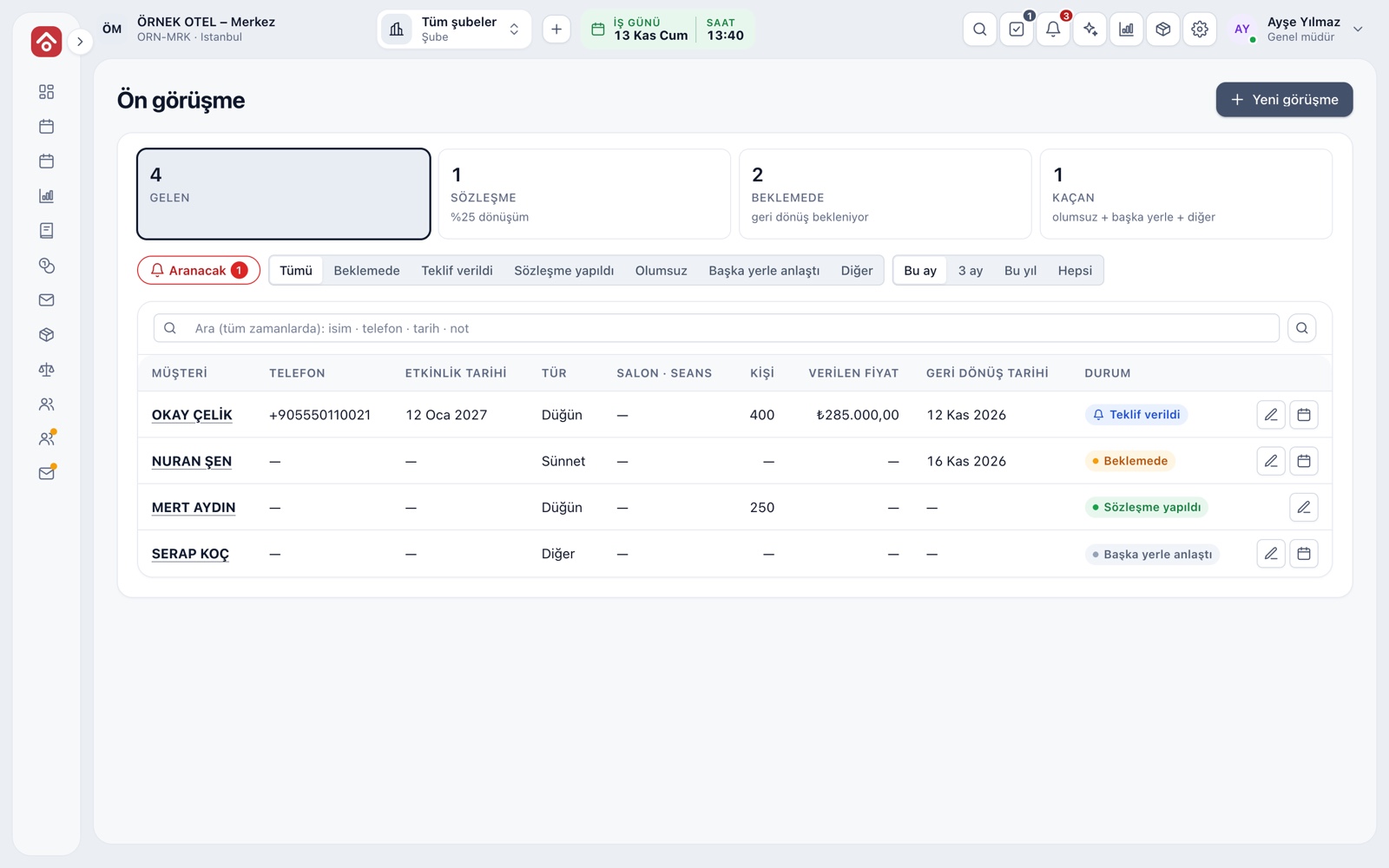
Inquiry screen
An inquiry is the record of any request that has not turned into a booking. Cards on top summarize the period: received, conversion to contract, pending and lost. Below are status filters and a search box.
- Period: this month, 3 months, this year or all
- Search works on name, phone, date and note
- From a row you edit the inquiry or turn it into a booking
Lead card
A new inquiry is saved with a few fields: customer name, phone, preferred venue, date, event type, guest count, quoted price, referral source and note. A lead does not hold the venue, so the calendar fills only with customers who have decided, while every date discussed stays on record.
- Only the name is required; the rest is completed as talks progress
- The quoted price reminds you what you told the customer
- The referral field records how the lead found you
Follow-up and call-back list
Every inquiry gets a follow-up date; if left empty, three days later is set. Inquiries whose date has arrived or passed drop into the call-back list, and a red number shows how many people to call today. No follow-up call is forgotten.
- Statuses: Pending, Quote given, Contract signed, Declined, Went elsewhere
- Push the follow-up date forward to postpone a call
- A closed inquiry no longer appears in the list
Turning an inquiry into a booking
The button on a row opens a booking form filled in from the inquiry; name, phone, date, venue and guest count are not retyped. When the booking is saved, the inquiry becomes Contract signed. The conversion rate is the share of received inquiries that reached a contract.
- An inquiry converted to a contract cannot be changed
- The conversion rate follows the selected period
- Every status change is logged
Customer record and events
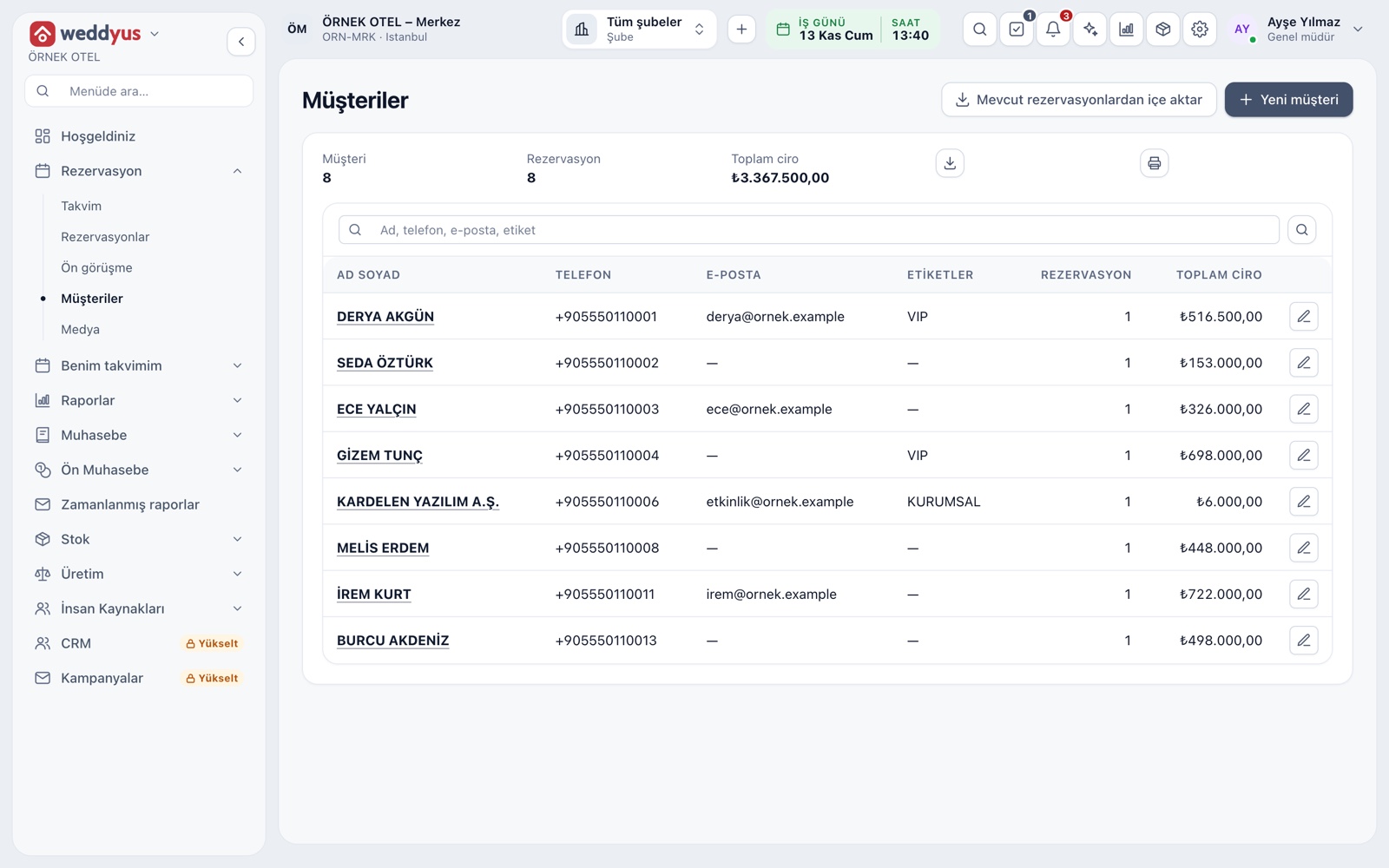
When a booking is saved, the customer enters the Customers list by phone number. The list shows name, phone, tags, number of bookings and total revenue. A customer may have several events; only confirmed ones count toward revenue.
- Search by tag (VIP, corporate) or by name, phone and email
- A new event from the same phone joins the existing customer
- The note field is for what the team knows
- Export or print the list
Personal data and anonymization
A customer record is never deleted; on a personal data request it is anonymized. Name, phone, email, address and notes are permanently erased while bookings and revenue remain. Consult your legal adviser on how this applies to you.
- Anonymization needs a confirmation and is logged
- An anonymized customer shows as Anonymous in the list
- Users without permission cannot see the customer list
Modules used together
Event Management
Lead, option, confirmed, completed and cancelled statuses
Learn moreVenue Calendar and Booking
Day/night calendar, option periods, conflict warnings
Learn moreQuotes and Contracts
Same-day quote, PDF from template, digital approval
Learn moreWedding Tracker
One file for every event
Learn moreVenue Reports
Occupancy, revenue, deposit aging, conversion rate and cancellation reasons
Learn moreFrequently Asked Questions
What is the difference between a lead and a booking?
An inquiry does not hold the venue; it only stores the date discussed, the price and the follow-up. A booking holds the date on the calendar.
How is the conversion rate calculated?
It is the number of inquiries that reached a contract divided by the number received in the chosen period.
Who appears in the call-back list?
Inquiries that are Pending or Quote given and whose follow-up date is today or earlier.
Can I delete a customer record?
No. On a personal data request the record is anonymized; name, phone and contact details are erased while bookings and revenue remain.
Can one customer have several events?
Yes. All events linked to the customer show in their list; only confirmed ones count toward revenue.
Meet Leads and Customers
Let us call you for a live walkthrough, or try it free for 1 month.